Chapters
On this page
The Target Card tab sits third in the Ballistics view. It takes the same solve everything else on that page reads, and lays it out the way a stage actually runs: target by target, in order, with the turret carrying over between them.
A plan, not a drop chart
This is the idea the whole card is built on: your elevation dial does not reset between targets. A hold is measured from wherever you left the turret, not from your zero. So a 600 yd target that rides a 450 yd dial shows a small number, and that small number is correct. It is what is left after the dial you already have on.
Two lines sit above the rows: the load, and the conditions it solved at. With no weather entered the second line says Using ICAO Standard Atmosphere, so a card you export or hand to someone else carries the standard it was solved on rather than implying you measured the air.
The card flags what it is not sure of. Past a certain speed a bullet crosses back through the sound barrier and gets unpredictable, so a transonic target is marked lower-confidence rather than handed to you as a clean number. And anything it cannot solve at all reads as dashes, never a zero and never a plausible-looking guess.
Building a card
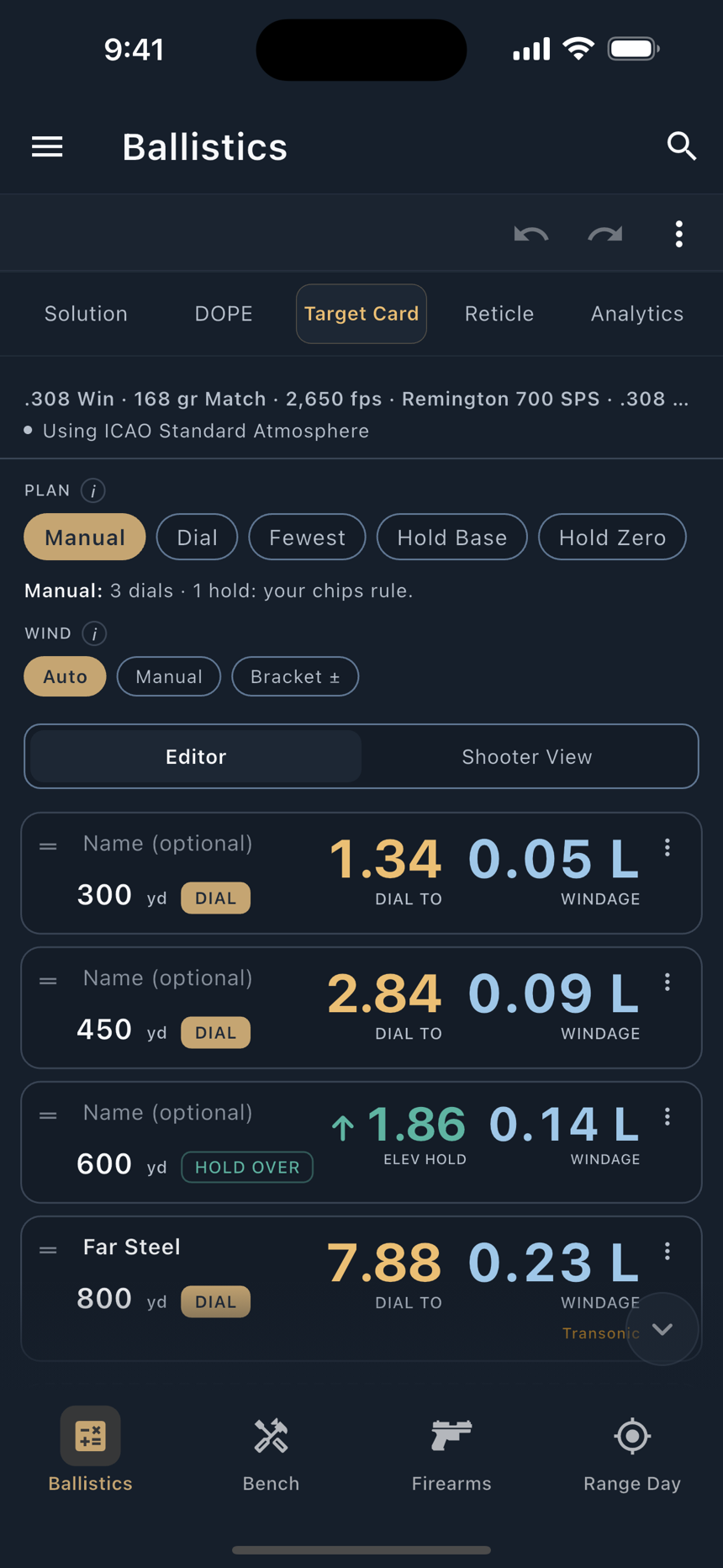
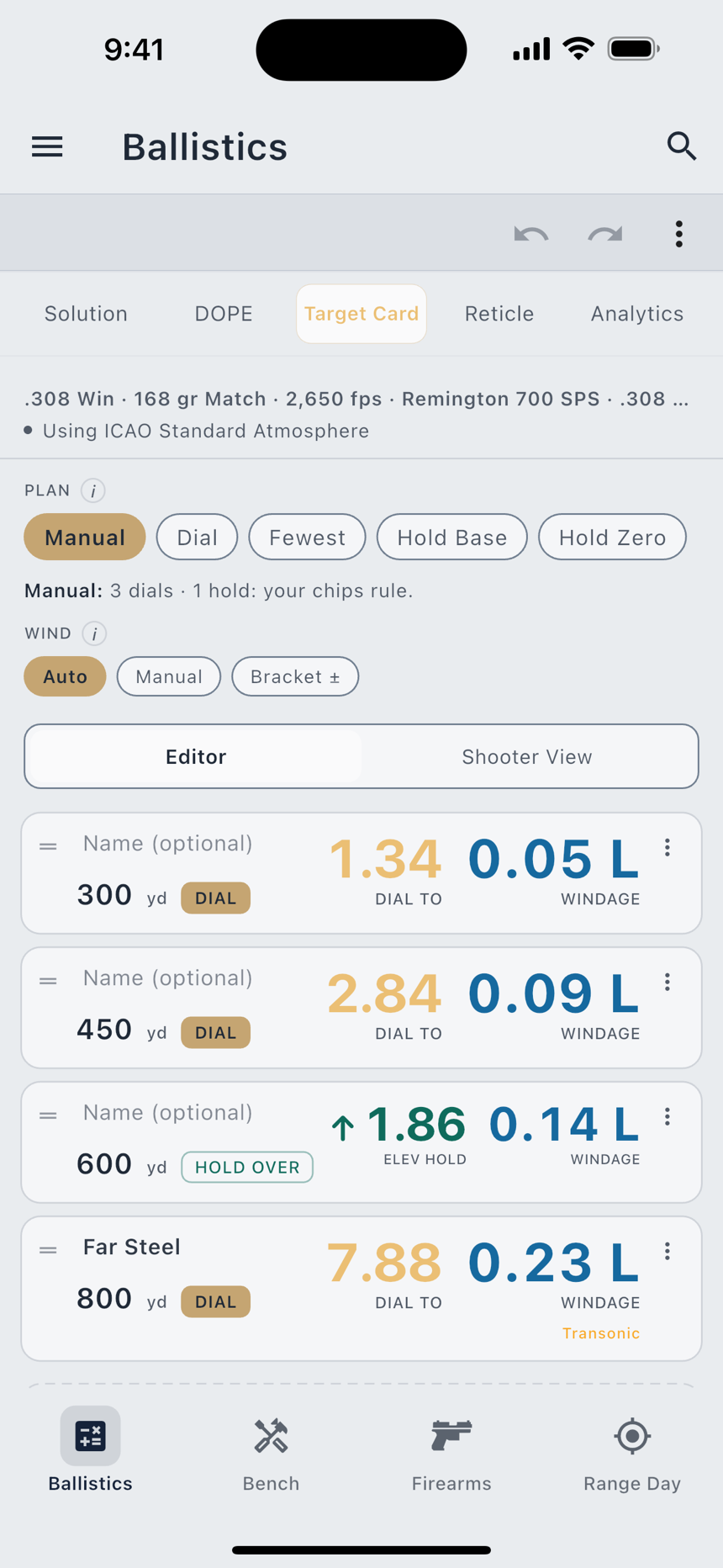
The empty card says what to do: add the distances you plan to shoot. The card solves each one and tracks your turret down the list.
- Add the distances. The Add Distance field takes one distance ("725") or several separated by spaces ("300 500 650"), in the order you will shoot them. Drag the handle on any row to re-order.
- Pick a plan. The chip row across the top assigns every move for you. Tap one and watch every row change at once.
- Overrule where you need to. Tap a row's method chip to force that target to dial or hold.
- Give it a wind. Auto, your own call, or a bracket. See below.
- Switch to Shooter View when the card is right, and read it on the clock.
The five plans
| Plan | What it does |
|---|---|
| Manual | The default. The plan assigns nothing and your own chips rule. A hold rides the last row you dialed. |
| Dial | Dial every shot, no holds. Switching here clears your per-row chips. |
| Fewest Dials | The fewest turret moves that keep every hold under a cap you set, and each row says why it got the move it got. |
| Hold Off Base | Dial once to a base (the engine's suggestion, or a base you pin yourself) and hold everything else off it. |
| Hold Off Zero | No dialing at all. Best up close. |
The distinction between Manual and the pure plans is worth knowing before you lose work to it. Under Fewest Dials, a chip you set becomes a constraint the optimizer plans around. Under the pure plans (Dial, Hold Off Base, Hold Off Zero) switching in clears your per-row chips, and each plan's tip says so before you tap it. Keep Holds Under is the cap Fewest Dials optimizes against, and it is on the card where you can see it.
Wind is a call
Wind is the one input nobody measures at the target. LoadOut treats it as a call and never pretends otherwise. Three modes:
Bracket is the honest one. Give it your calm end and your gusty end and every target shows a range instead of a single number, so you can see which targets the wind actually decides. On a close target the spread is nothing; far out it is the difference between a hit and a miss. Neither Auto nor Manual pretends to be measured; both are what you told it.
Per-target exceptions
Each row has its own menu, because a string of targets is rarely uniform:
Spoken callouts
The Spoken Callout field is labelled Spoken Instead of the DOPE, and the hint under it states the contract: read aloud exactly as written. Write "hold one and a half left, favour low" and that is what you hear. The app does not rewrite it, shorten it, or fold a number back in. Callouts are capped at 96 characters; the field stops accepting them at the cap and shows a counter, so a callout is never silently cut in half on its way to the watch.
A callout replaces the numbers for every verbosity setting, on the phone and on the watch alike. The row's Callout Text option additionally draws your words on the watch face in place of the DOPE for that target; the callout is still spoken either way.
Shooter View and export
Shooter View strips the card to the numbers you read under time: DIAL TO or ELEV HOLD and WINDAGE, big enough to read at a glance. It also reads a callout aloud where you wrote one. A single tap marks where you are on the card; a double-tap on any row opens its detail.
Export Card in the top-right menu sends the whole thing out, each callout beside its target, in shooting order:
PDF and Image take the app's standard path: written to LoadOut's own temporary directory, then handed to the system share sheet, so you choose where each one goes. Text is different. It goes to your clipboard, ready to paste into notes or a match book.
The card on your watch
A solved card goes to the wrist, so a stage can run with the phone in a bag. The limits are size limits, and they are not the same on every platform: about 33 targets fit on Apple Watch and Wear OS, and about 53 on Garmin.
A card longer than a watch can hold is not sent at all, and nothing shorter is sent in its place. The card tells you which watch it did not reach, by name, rather than leaving you to discover a stale card on your wrist. Trim a few targets and re-send.
The Garmin ceiling being higher than Apple Watch's is not a typo: those rows carry less per target, so more of them fit in a smaller budget. What travels, page by page, is covered in Companion Watches.
Custom DOPE cards
The Target Card plans a string. A custom DOPE card is the other thing: the reference sheet you tape to a stock, with your rows and your columns.
You choose the ladder first, in one of three shapes. Stepped is a uniform interval, every 50 yd from 100 to 1000, say. Banded takes your own spans, each printed under its own heading. List takes your own ordered distances, exactly as you wrote them: a real paper card is often coarse where the trajectory is flat and dense where the drop steepens, and that is a decision you made, not an irregularity to round away.
Then you choose what each column holds:
| Column | What it prints |
|---|---|
| Range | The row's own distance. |
| Drop | The elevation come-up. |
| Come-Up | The same angle, under the name you dial by. It reads the same solve, so the two can never disagree. |
| Wind | The full-value hold at a speed you name. The header always prints that speed, so a column can never be read at the wrong wind. |
| Velocity | Retained velocity, in fps. |
| Time of Flight | Seconds. |
| Energy | ft·lb. |
| Lead | The lead for a full-crossing target. |
| Write-In | A column the app never fills. It prints a header and leaves the cells empty for your pen. |
The card's angular unit is MIL, MOA, or Clicks. Clicks is offered only when your scope publishes its click size. There is no assumed quarter-MOA anywhere in LoadOut, because a card that guesses your turret is worse than a card that makes you convert.
Add a wind column more than once at different speeds and you have the wind table most shooters actually want: one card, several calls, each header naming its own speed.
The printed footer is permanent and never conditional: "Predicted from your current solve: a quick reference, not confirmed dope. Confirmed values live in the Dope Card." Paper is the one surface where you cannot ask the app what happened, so the sheet carries its own provenance off the phone with it.
Send Cards
Send Cards takes the card you are looking at off the phone and puts it where you can read it on the line: on an NFC card on the rifle, on your e-reader, or on paper. It is one row, and it opens one sheet.
On a custom DOPE card, tap Send Cards at the top of the page, next to Print / Export. On the Solution tab, the Match page and a Match Day stage, it is a row in the ⋮ menu. A stage shows it once the stage has targets and the match has a profile to solve them. On Range Day, tap Open DOPE Card in the ⋮ menu. Once the session is saved, the DOPE Card screen has Send Cards in its own ⋮. The Target Card, the Match Card and the DOPE table send from their export sheet instead: pick NFC Card or E-Reader there. The web app has no Send Cards.
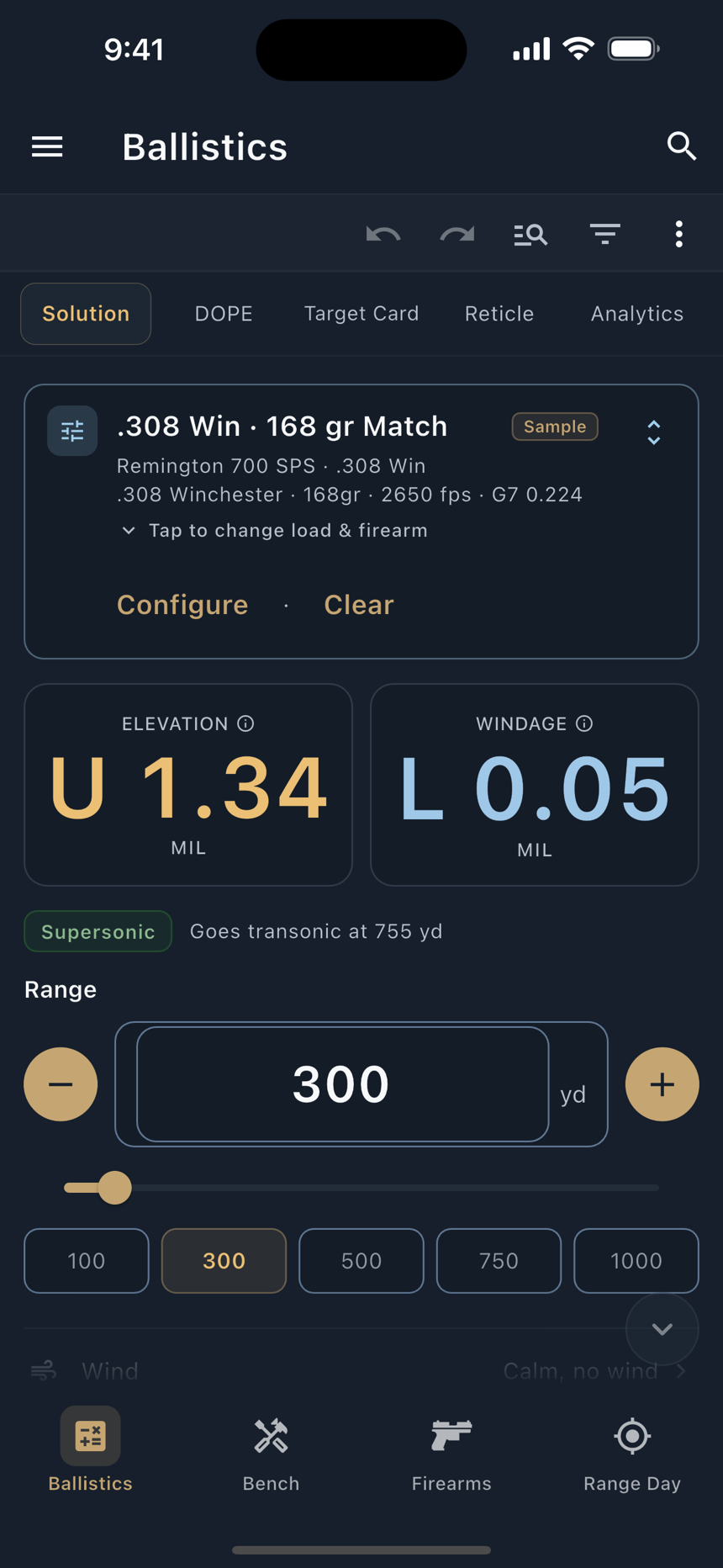
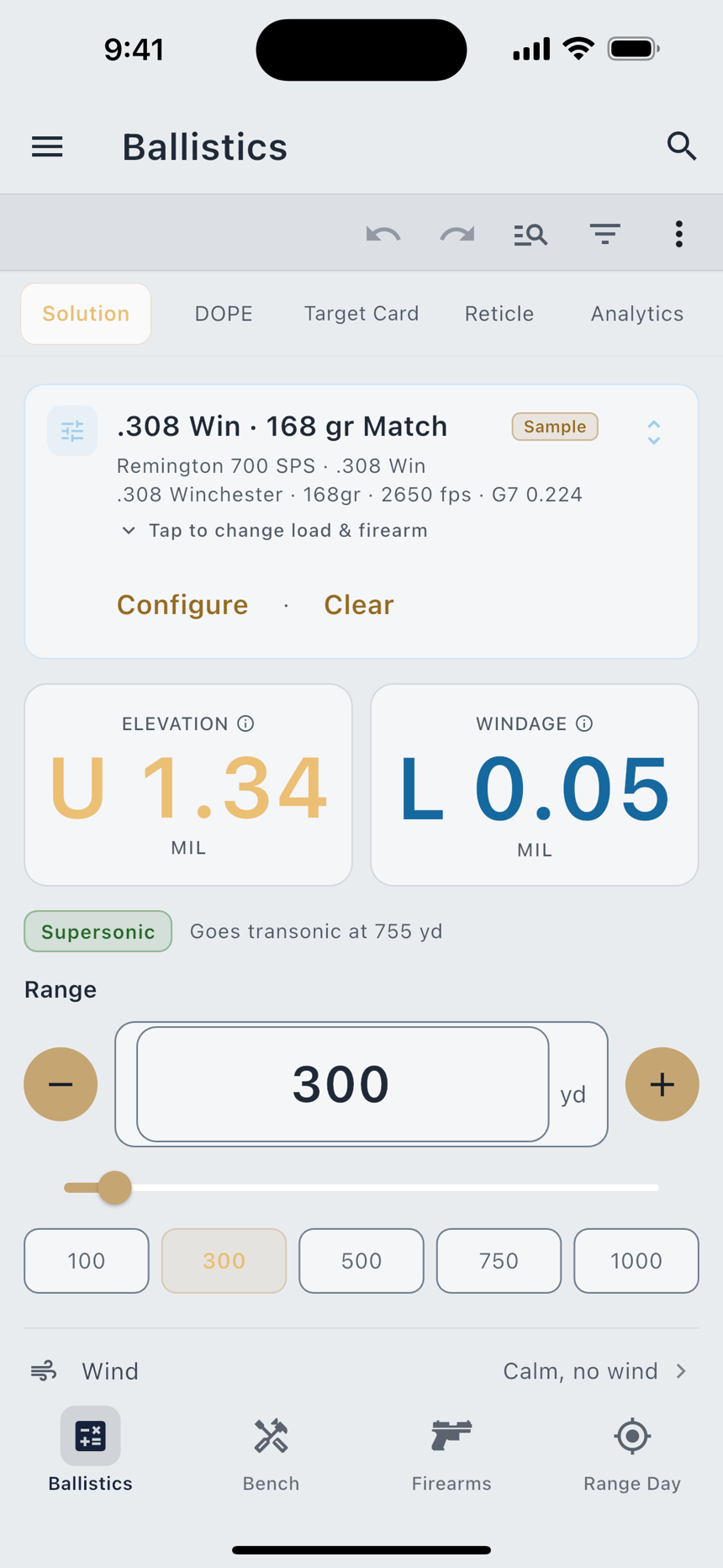
The sheet shows only the rows this screen and this device can use.
Whichever of Send to NFC Card, Send to E-Reader and Print you used last sits at the top the next time. The three NFC rows are not there on a Mac. On a phone with no NFC, or with NFC turned off, they say so and stay grey. When the screen has no card to send yet, such as a Solution tab with no hold, Send to NFC Card, Send to E-Reader and Print are grey with the reason, and so is Send Cards itself. On the Match page they stay grey until there is a stage and a profile to solve it. On an iPhone, Send Cards stays live for Scan NFC Sticker, which needs no card.
The card on your rifle
Send to NFC Card writes the card you are looking at onto an NFC e-paper card mounted on the rifle. The card needs no battery. It keeps the picture until you send it a new one, so your numbers stay on the gun while the phone stays in a bag.
It is a row of Send Cards. On the Target Card, the Match Card and the DOPE table, pick NFC Card on the export sheet. If the phone has no NFC, or NFC is turned off, the row says so and stays grey. The web and Mac apps have no NFC, so the row is not there.
The preview stays at the top while the rest of the sheet scrolls under it, with Cancel and Send at the bottom.
If the card cannot hold every row, a red line under the preview says how many fit. LoadOut never cuts rows to make a card fit. Shorten the range, or use a bigger card. A card that holds every row shows no line at all.
Tap Send and hold the phone to the card. On an iPhone, hold the top edge flat against it. On Android, hold the back of the phone against it. Keep still while the bar fills.
When the write finishes, the sheet says one of two things. A card that reports its refresh shows Card reports refresh complete. A card that does not report it shows Every frame accepted. The card refreshes on its own. Either way the card cannot send the picture back, so look at it before you shoot from it. If the phone moves away too soon, the sheet says the card stopped answering and how far the write got. Tap Send Again and hold still. Lifting the phone a quarter inch off the card often helps. If your phone stops looking before it finds a card, the sheet says No card found. Try again.
NFC stickers
Write NFC Sticker puts a link to one saved card on a plain NFC sticker. It sits at the top of a saved custom DOPE card, next to Send Cards, and is a row of that card's Send Cards sheet too. A saved Target Card or Match Card has it in its ⋮ menu. A saved firearm has it in the ⋮ menu of its form, and that sticker opens the rifle on the Ballistics page. The sheet names what the sticker will open and tells you that writing replaces anything already on the sticker. Tapping Write NFC Sticker is your yes. While the sheet waits for a sticker, Cancel stops it, and if your phone stops looking first, it says No sticker found. Try again.
Tap the phone on the sticker and LoadOut opens that card. Most phones pick it up on their own, and an iPhone shows a notice you tap. On an iPhone 7 to X, open Send Cards and tap Scan NFC Sticker, then hold the phone to the sticker. Send Cards has that row on every iPhone. The sticker holds a link and no numbers. It opens its card in your own LoadOut: on the phone that wrote it, or on a phone with your data from a restored backup, a LoadOut export or Cloud Sync. Any other phone says This sticker's card is not on this phone. and opens nothing.
The card on your e-reader
Send to E-Reader puts the card on an e-reader or an e-paper photo frame you own. Over Wi-Fi the card is drawn dot for dot for that screen. You can also share it as a page or a picture. It is a row of Send Cards, and on the Target Card, the Match Card and the DOPE table it is E-Reader on the export sheet. It works on phones, tablets and the Mac app, and not in the web app.
The preview stays at the top and shows what will go. Under it:
Over Wi-Fi
Send to E-Reader works with e-readers and e-paper photo frames running one of three firmwares: CrossPoint (or a firmware built on it), ReadPaper or esp32-photoframe. It also works with some readers still on their stock firmware. LoadOut installs nothing on the device. It talks to the firmware already there.
- Put the e-reader on the network. On CrossPoint, open its file transfer screen. A reader on its stock firmware can stay on your Wi-Fi: open its phone transfer screen, which shows a QR code and no address. The reader's own hotspot is another way: turn the hotspot on at the reader and join it in your phone's Settings.
- Type or scan its address. Put the address the e-reader shows in E-Reader Address. A whole web address works too, and LoadOut keeps only the address part. If the e-reader shows a QR code, tap Scan QR Code beside E-Reader Address and aim the camera at the code. The field takes the address in it. A code with no address in it shows No address in that code. Scan QR Code is on phones and tablets, not in the Mac app. LoadOut remembers the address for next time.
- Tap Send. LoadOut finds the e-reader, draws the card for its screen and sends it. While it works, the sheet says Sending to the reader.
When the send finishes, the sheet says what happened. A CrossPoint reader gets the card in a LoadOut folder, and each send replaces the last one, so the sheet says Sent to the LoadOut folder. With Sleep Screen on it says Sent, and set as the sleep screen. Any other firmware says Sent. After a send to a reader on its stock firmware, the sheet adds Set it as the wallpaper on the reader. Do that on the reader itself.
If nothing answers, the sheet says No reader found. Try again. and Check that your phone and the e-reader are on the same Wi-Fi. Check the address too, then tap Send Again. On an iPhone, the first send asks for permission to find devices on your local network. Allow it, and if that first try finds nothing, tap Send Again. An iPhone also shows Allow LoadOut under Settings, Privacy & Security, Local Network. That is where the permission is if you said no. The reader refused the card. means it answered and would not take the file. Connection lost. Try again. means the link dropped part way.
With Wi-Fi picked, the sheet says nothing about fit until it knows the e-reader's screen. Until then the preview draws the card for the smallest screen it fits, or shows an empty frame if it fits none. The screen is known once the e-reader names it at Send, once you pick it under E-Reader Screen, or as soon as the sheet opens for an e-reader LoadOut remembers. If that screen cannot hold the card, a red line takes the preview's place and names the screen, such as The columns are too wide for the 3.7 in screen. Pick fewer columns, or use Landscape. or 15 of 20 rows fit on the 3.7 in screen. Shorten the range. Nothing is sent.
The card crosses your Wi-Fi, or the e-reader's own hotspot, as a plain picture. It is not encrypted, and the e-reader does not check who sends to it, so anyone else on that network at that moment could see it or change it. It goes straight from your phone to the e-reader. No LoadOut server is involved. The card stays on the e-reader until you delete it there, where neither erase operation in Privacy & Data can reach it.
Share Page and Share Picture
The two shares make no connection of their own. They hand the card to your phone's share sheet, and you choose where it goes: the e-reader's own app, a file, a message. Neither asks what screen you have.
Both start on the reader page. Page Shape changes it: Reader Page, Phone-Shaped Page for a tall, narrow device, or Large Page for a screen of about 10 in or more. If the card does not fit, the preview says so, offers every other page the card does fit, and opens Page Shape. The page shape you pick lasts until the sheet closes.
The card on paper
Print in Send Cards puts the card on the 6 in reader page that Share Page starts on, upright, and opens your phone's print sheet, where you pick the printer. It prints the fields you last chose on this screen in Send to NFC Card or Send to E-Reader, and leaves the note off.
If the card does not fit that page, Pick a Page says This card does not fit the 6 in page. and lists the other pages it fits, named by size. If it fits none, nothing prints, and a line says how many rows fit or that the columns are too wide to print. If the print sheet cannot open, you see Printing did not start.